DJI AP1 Parachute Preflight: When a Safety Device Is Not Ready


A DJI Matrice 5TD returns from maintenance with an AP1 parachute mounted, yet FlightHub 2 reports a parachute warning before the next mission. The crew considers resetting the aircraft, manually triggering the parachute or swapping it with the larger AP100. Those choices mix up very different emergency systems. DJI AP1 is specified for the Matrice 5TD accessory platform and Dock 4 ecosystem—not the Matrice 400’s AP100 installation. A safe return-to-service decision begins with the actual AP1 mounting, firmware, warning and replacement rules.
AP1 compatibility: identify the aircraft and mount
The DJI AP1 Parachute is a manufacturer-supported safety accessory in the DJI Matrice 5TD / Dock 4 platform. DJI specifies installation on the aircraft’s top side using the Matrice 5TD Accessory Mount. The mount itself is a distinct mechanical component; the parachute must be properly attached and its screws tightened. DJI warns against connecting or disconnecting AP1 while the aircraft is powered on.
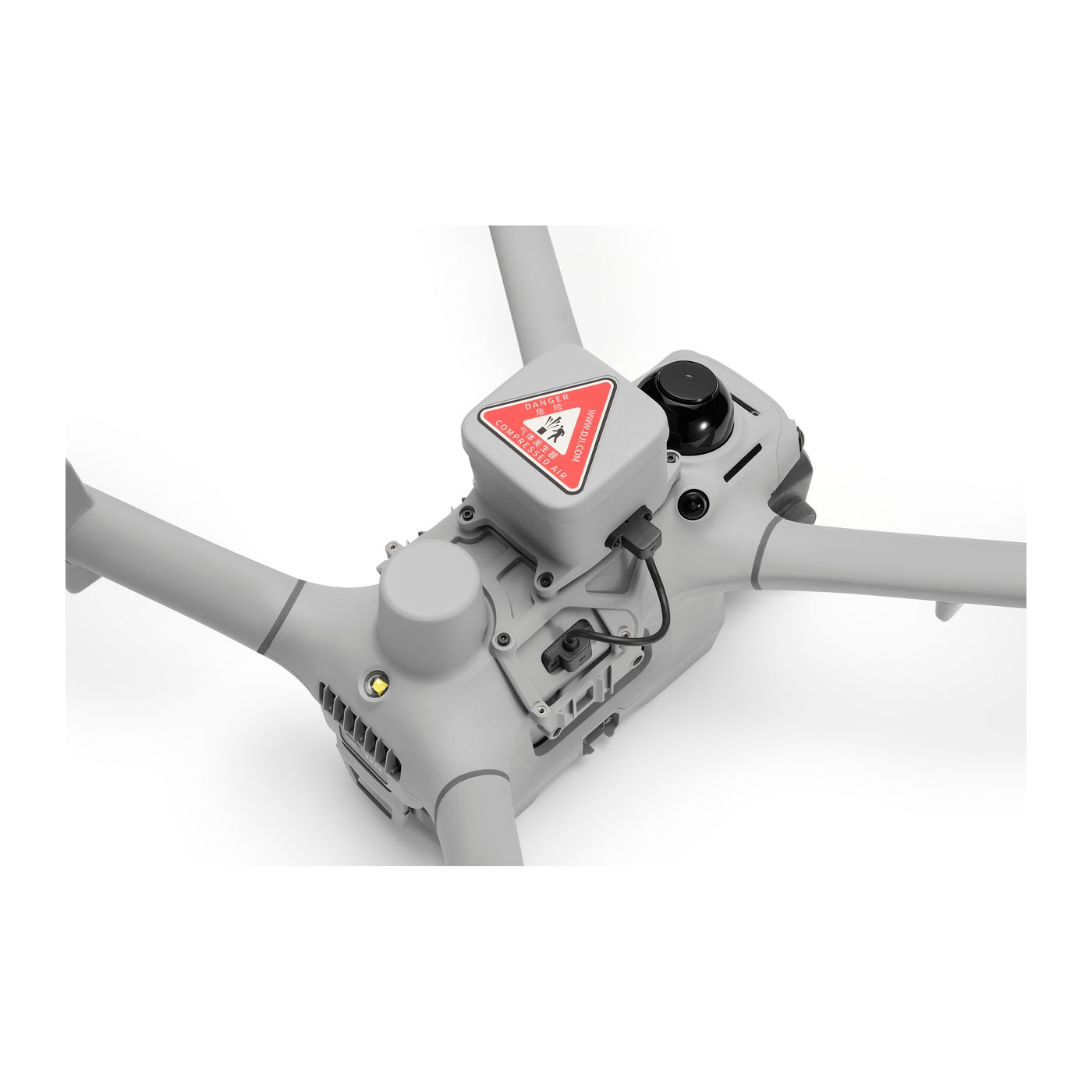
DJI AP100 is a different parachute specified for Matrice 400, with another payload limit, deployment envelope and radar-impact pattern. Do not reuse the Matrice 400 mounting or certification advice on AP1 merely because both are DJI parachutes. Compare the genuine accessory’s serial/model identifier and the compatible aircraft documentation before using or purchasing parts.
AP1 performance and the minimum useful deployment height
| DJI AP1 characteristic | Manufacturer reference | What it means in practice |
|---|---|---|
| Parachute unit mass | 107 g, excluding bracket | Include the mount and other accessories in aircraft takeoff weight |
| Maximum supported aircraft takeoff weight | 3,050 g | Not a load rating for heavier Matrice 400 systems |
| Minimum effective deployment altitude | At least 35 m | At lower heights the parachute may open but fail to stabilise descent |
| Stabilised descent rate | Less than 6 m/s in the stated test | Not guaranteed in wind, turbulence or very low-altitude incidents |
| Automatic deployment response | 600 ms, laboratory reference | Includes the defined FTS/rotor-stop sequence; not instantaneous canopy inflation |
| Environmental rating | IP55, operating temperature −40°C to 50°C | Always respect the airframe’s and complete system’s more restrictive limits |
| Operating altitude specification | 0–5,000 m above sea level | Not permission to fly at any airspace altitude or exceed the craft’s capability |
| Maintenance | Every six months or sooner | Inspect connections, indicators and cover, and follow the current manufacturer service guide |
The 35 m minimum effective height deserves particular attention on low-altitude inspections. DJI says that if AP1 deploys below that height it may not fully inflate, and in certain cases automatic triggering may not occur. It is therefore unsafe to treat a parachute as a complete solution for a low roof, hovering near a wall or an obstacle-rich takeoff area.
Obstacle sensing changes when AP1 is fitted
DJI confirms that installing AP1 on the Matrice 5TD automatically changes the aircraft’s obstacle-sensing configuration. In particular, the ability to sense small obstacles behind and above the aircraft is affected. This is not the same set of sensor changes documented for Matrice 400/AP100, where downward and backward millimetre-wave radar are disabled. Do not transpose the AP100 directional warnings and claim they describe AP1 exactly.
When planning a Dock 4 mission near a facade, crane, tree canopy or power line, revisit the clearance behind and above the airframe, update observer or remote-monitoring procedures and check the actual sensing status in the supported software. A recovery device changes the risk profile; it does not improve normal obstacle avoidance.
Why the warning should be diagnosed before another flight
| What the operator sees | First AP1-specific evidence to check | Safe decision |
|---|---|---|
| AP1 not recognised after mounting | Aircraft model, Matrice 5TD mount, power-off installation, fully seated connector, firmware | Ground the aircraft until the accessory can complete manufacturer checks |
| Unusual indicator light or warning in FlightHub 2 | HMS exact event text, status LED and gas-generator/communication self-check | Record warnings and use DJI service procedure instead of test deployment |
| Cover or screws loosened after a bump | Protective housing, mounting screw tightness and connector strain | Replace damaged items; do not repair the pyrotechnic deployment mechanism |
| Obstacle alerts changed after AP1 installation | Manufacturer-described small-obstacle sensing limitation behind/above | Update route clearance and risk assessment; do not bypass a restricted sensor |
| Parachute already deployed once | Deployment history and replacement requirement | Replace the complete AP1 system; it is single-use |
| Product has been in service for three years | Activation date and maintenance log | DJI recommends retirement/replacement regardless of normal daily self-checks |
Six-month maintenance and three-year service life
DJI’s Dock 4 FAQ states AP1 needs inspection every six months, or sooner if conditions warrant. At minimum, examine connector security, indicator status and the integrity of the parachute protective cover. Physical damage is not something to cover with tape or solve by disabling warnings; replace affected components in line with DJI guidance.
AP1 is a single-use emergency system. After a real deployment, the complete unit must be replaced. DJI recommends retirement and replacement three years after activation, even if self-tests continue to pass. Keep the activation date, periodic inspection, any warning and the replacement decision in the fleet’s maintenance record.
Seven-step commissioning checklist without a dangerous release test
- Identify the full platform. Record Matrice 5TD aircraft, Dock 4 or supported operator workflow, AP1 serial number, Matrice 5TD Accessory Mount and all relevant firmware versions.
- Shut down for installation. DJI expressly instructs operators to fit AP1 before powering the aircraft and never connect or disconnect it on a live system.
- Inspect mounting and cabling. Verify the top-mounted bracket, all approved screws, complete connector insertion and protected cable routing. Do not pull the cable hard or compromise its water resistance.
- Use official software diagnostics. Confirm AP1 appears as expected in DJI’s supported interface and review the FlightHub 2 Health Management System for the gas-generator and communication self-check results.
- Read sensor status. Brief the reduced detection ability above and behind the aircraft and preserve a conservative clearance during takeoff, approach and recovery.
- Check maintenance and mass. Verify inspection interval, activation age, undamaged cover and a total aircraft weight below the complete system’s applicable limits.
- Document return-to-service. Sign off the manufacturer-supported self-check and operating restrictions. If warning state remains uncertain, ground the aircraft and seek qualified inspection; never deploy AP1 merely to see whether it works.
Automatic and manual deployment are not the same as a guarantee
DJI specifies automatic deployment using a flight termination response and abnormal flight-state monitoring. The parachute also supports manual operation in its approved system. But a successful status check cannot establish that a crash at a very low altitude will end below 6 m/s; the canopy needs height to open and stabilise. Operational permissions, site safety, emergency coordination and obstacle clearance remain necessary.
The 600 ms response figure is measured in a controlled DJI test. It refers to a defined trigger, rotor-stop and gas-generator electrical signal sequence, not proof that a descending aircraft instantly reaches the rated stabilised speed in half a second. Treat the device as supplementary mitigation rather than collision protection.
Manufacturer sources and genuine replacement
Use DJI Dock 4 technical specifications (AP1 parachute section) for the 3,050g load, 35m minimum deployment height, descent rate and other technical numbers. The DJI Dock 4 parachute FAQ explains the Matrice 5TD mount, six-month maintenance, three-year retirement and changed obstacle sensing. Compare the actual accessory on FalconFly’s DJI AP1 product listing. Do not substitute Matrice 400/AP100 operating guidance for the Matrice 5TD AP1 system.