


DJI AL2 Spotlight Gimbal Self-Test Fails? Check Orientation Before Replacing It


A new DJI AL2 SpotLight can look defective during the very first power-on: its gimbal refuses to finish the self-test while the aircraft is still on the ground. This symptom has a specific installation explanation in DJI’s documentation. Before arranging a return, inspect the spotlight’s physical position and the exact aircraft configuration.
The easily missed ground-clearance problem
DJI instructs Matrice 5T operators to orient the AL2 spotlight lens upward before powering on. If it points down, the spotlight gimbal may contact the ground during self-check and enter protection. DJI notes that the self-check can complete after takeoff, but that is not a reason to launch with an unexplained warning or obstruction. First remove the physical cause and confirm the installed payload is secure.
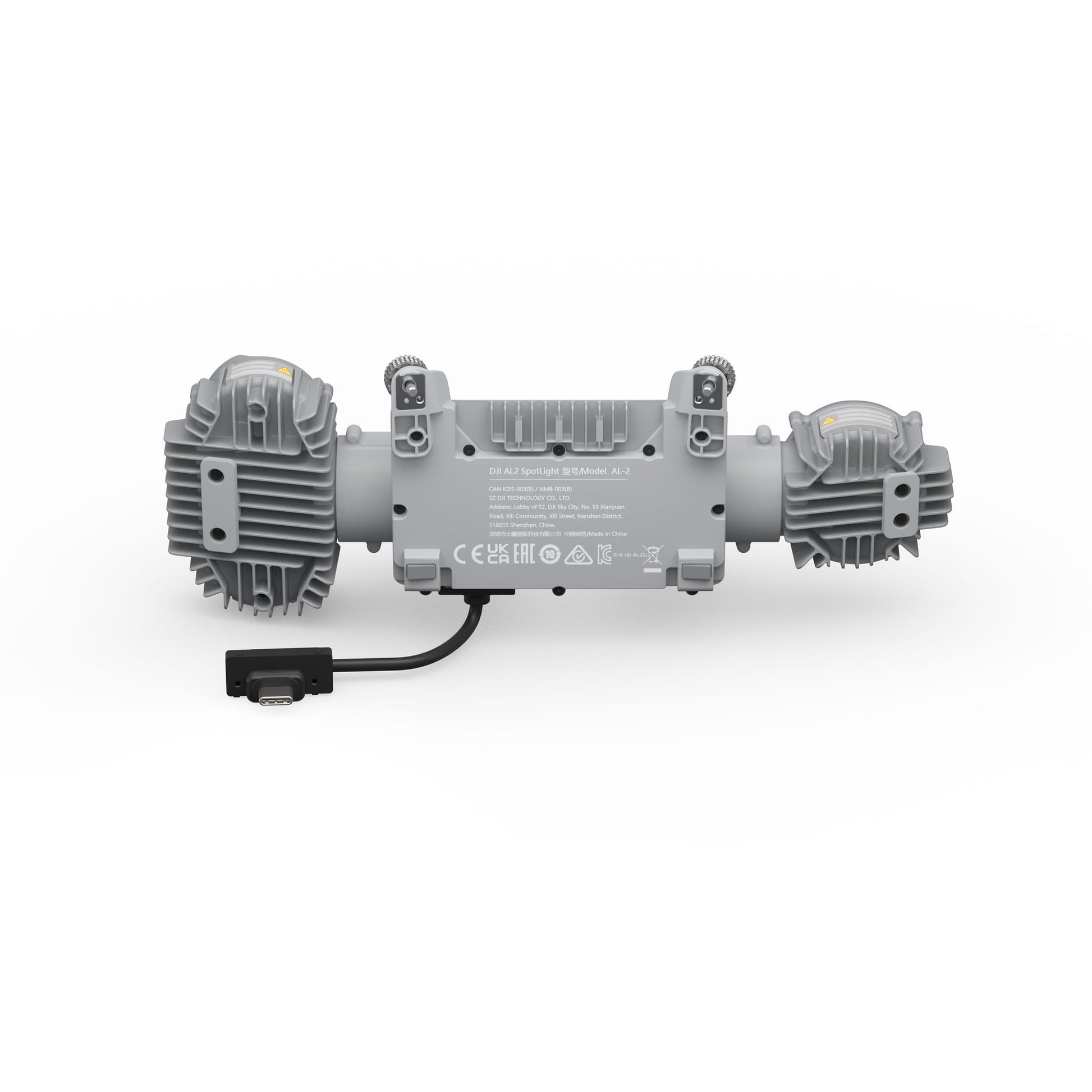
Step-by-step isolation of an AL2 startup warning
- Power everything down. Set the aircraft on a stable, clear surface and avoid forcing the spotlight head by hand.
- Check its folding arms and lens orientation. Unfold the spotlight arms as DJI directs, orient the lens upward, and verify the head is not pressed against the aircraft, ground or transport foam.
- Inspect the connector seating. The AL2 uses its aircraft USB-C accessory connection and mounting screws. An incompletely seated connector can also compromise its intended environmental seal.
- Confirm activation and firmware. Reconnect to the internet, follow DJI Pilot 2 accessory activation prompts and complete any prompted update before testing again.
- Check the exact aircraft. The official AL2 compatibility listing is for DJI Matrice 5T; do not confuse it with the AL1 accessory for Matrice 4.
- Retest stationary, without a flight mission. If the mechanism still binds despite correct orientation and mounting, stop and request authorized servicing. Do not bypass the safety check in flight.
Why the light sometimes points in the ‘wrong’ direction
The Follow Gimbal Orientation function is enabled by default after restart. If an operator disables it in the AL2 settings, the spotlight stays at its current angle until that function is re-enabled. This is a configuration choice, not necessarily a tracking fault. Confirm the setting before blaming the gimbal calibration.
Flood, spot and strobe: which solves the job?
| Lighting choice | Practical use | Main limitation |
|---|---|---|
| Flood | Broad scene awareness at closer distances | Less concentrated illumination |
| Spot | Directed inspection of a specific distant point | Narrower area, precise aiming needed |
| Strobe | Visibility and signaling under an approved operation | Not a substitute for target illumination |
DJI lists up to 10±0.5 lux at 100m in the Spot setting and 2.5±0.3 lux at 100m in Flood under lab conditions. Water vapor, dust, rain and atmospheric haze can scatter the beam into the camera; trying electronic defogging and adjusting lighting intensity may help more than always using maximum brightness.
AL2 and AS2 together: a specific installation order
If the aircraft also carries a DJI AS2 Speaker, DJI instructs installers to mount the spotlight first, then the speaker. Do not assume the order is interchangeable. Both accessories add mass and power demand; allow for reduced flight performance and verify legal nighttime operating conditions.
When to escalate
Stop troubleshooting and request inspection if the housing is cracked, the moving head catches even with correct orientation, the accessory repeatedly fails initialization after firmware consistency checks, or the aircraft reports an unexplained sensor warning. Keep a record of firmware versions and pilot-app error wording.
AL2 and AL2D are different Matrice platforms
DJI specifies the AL2 SpotLight exclusively for Matrice 5T. The similarly named AL2D is a separate accessory for the Matrice 5TD / Dock 4 platform and uses its own side-mounting method and software. Do not move one to the other aircraft based on a similar product name or apply AL2D’s mounting instructions to an AL2 self-test failure.
Actual illumination modes and reference performance
| AL2 configuration | DJI reference at 100m | Operational use |
|---|---|---|
| Flood lighting | 2.5±0.3 lux; approx. 1,500m² illuminated area | Broader scene orientation and nearby surface context |
| Spot lighting | 10±0.5 lux; approx. 500m² illuminated area | Narrower, brighter observation on a specific target |
| Strobe | Slow, Fast and Alternating flashing modes | Approved signaling rather than general imaging illumination |
| Gimbal orientation following | Controllable -90° to +90° tilt | Tracks the selected camera view when enabled |
The 60W maximum power and 175g accessory weight both affect the aircraft’s power and mass budget. With Matrice 5T accessories installed, DJI lists the relevant maximum operating altitude as 4,500m, rather than the unladen aircraft’s 7,000m takeoff-altitude figure. These are manufacturer reference conditions, not proof of a particular mission’s legal flight altitude. If the illuminator washes out a foggy image, consider DJI’s electronic defogging function and reduce brightness when practical instead of assuming a defect in the camera.
A model-specific startup and software checklist
- Power off and unfold both light arms before installation; verify that the correct AL2 USB-C interface is fully seated with its required water-resistance seal and mounting screws tightened.
- Point the AL2 lens upward before powering on so the gimbal does not strike the ground during its self-test. The official warning is about a physical clearance/protection state; forcing the gimbal by hand can make things worse.
- Confirm internet activation and version consistency in DJI Pilot 2. DJI supports spotlight firmware updates through aircraft firmware, DJI Assistant 2 Enterprise or in-app consistency upgrade prompts.
- Separate stationary orientation from a faulty motor. The Follow Gimbal Orientation setting can be turned off intentionally; when disabled, the light holds its current angle. DJI re-enables following on each aircraft restart.
- When using AS2 speaker as well, install AL2 first and then the speaker, as specified by DJI for Matrice 5T. Check their mounts and clearances together.
- Reassess obstacle sensing and landing reserve. DJI warns that illuminated AL2 can affect the vision system, while the accessory adds drag and electrical load. Maintain separation and stop on unresolved critical warnings.
For the exact firmware and supported modes, see the DJI AL2 installation and self-test FAQ and official AL2 specifications. Both are for Matrice 5T, not Matrice 5TD’s AL2D.
Technical sources
Official DJI Matrice 5T FAQ – Spotlight/Speaker precautions and DJI Matrice 5T accessory specifications. Product: DJI AL2 Spotlight.






























