


DJI RC Plus 3 Enterprise Won’t Connect? Check the Radio System Before Resetting


A new DJI RC Plus 3 Enterprise turns on, but the operator cannot link it to a Matrice 4T borrowed from another crew. The controller looks similar to DJI’s earlier RC Plus family, and all the screens mention DJI Pilot 2. That resemblance is misleading: DJI RC Plus 3 Enterprise is the specified remote for Matrice 5T, and DJI explicitly excludes Matrice 4, 4D, Mavic 3 Enterprise, Matrice 3D and Matrice 350 RTK. A firmware reset will not make an unsupported aircraft into a compatible one.
First verify RC Plus 3 versus RC Plus 2 or the original RC Plus
The DJI RC Plus 3 Enterprise uses DJI’s O4 Enterprise Enhanced video/control link with Matrice 5T and carries the manufacturer model designation TKPL 3. It has a 7.44-inch, 1920×1440, 2,000-nit display, a high-gain 4T4R antenna array, and a built-in battery rated at 6,933mAh / 99.01Wh. DJI lists up to approximately six hours of controller operation under its reference conditions. These features should not be mistaken for proof of universal backward compatibility with an older DJI Enterprise transmission system.
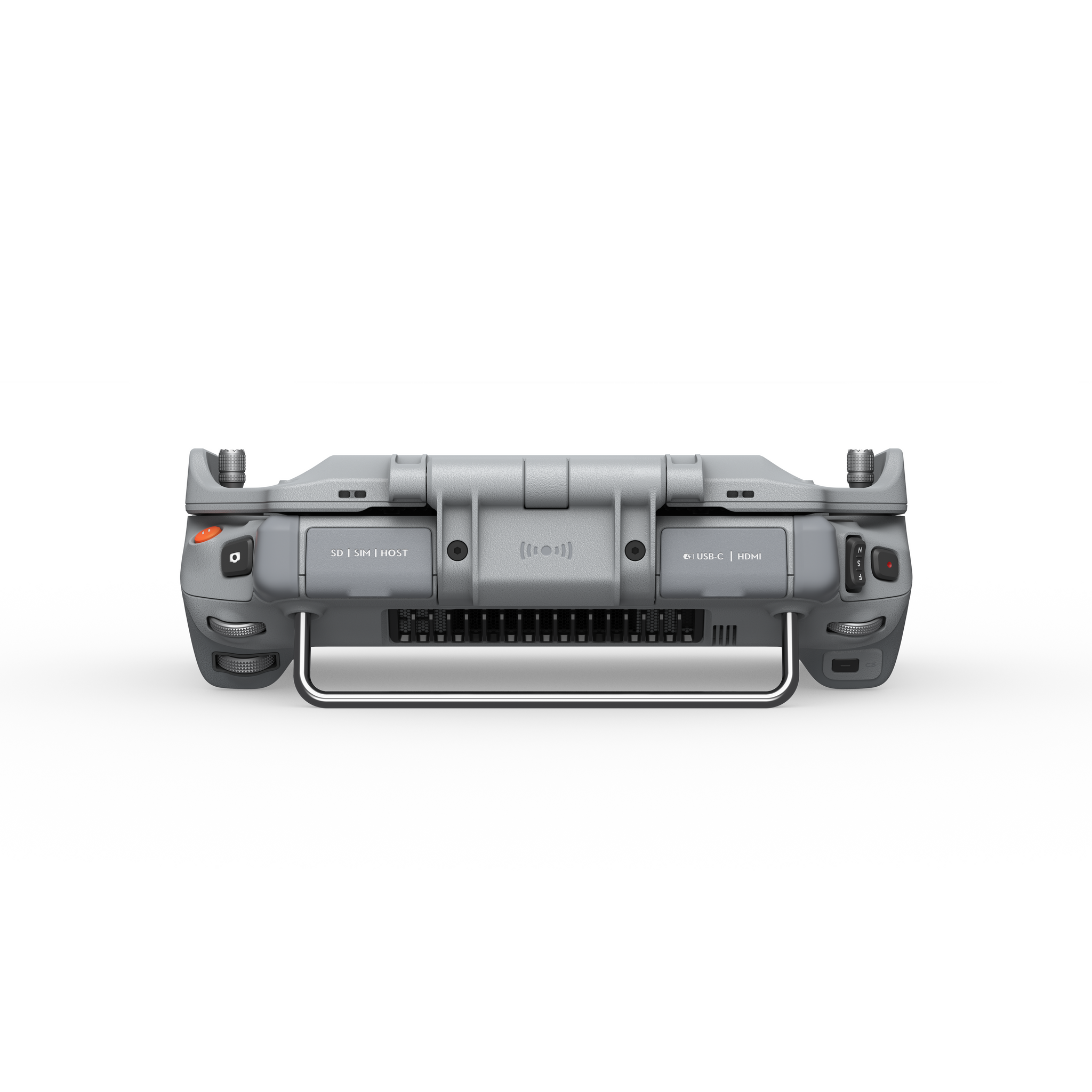
The supported controller model is a purchase decision as much as a troubleshooting choice. DJI’s official accessory compatibility chart lists RC Plus 3 Enterprise with Matrice 5T; earlier Matrice 4 series aircraft use RC Plus 2 Enterprise variants, while Matrice 350/30 use the original RC Plus and Mavic 3 Enterprise uses RC Pro Enterprise. A used-controller listing that says only “DJI RC Plus” may identify the wrong generation.
Remote-controller compatibility matrix
| Aircraft | DJI-supported remote family | RC Plus 3 Enterprise supported? |
|---|---|---|
| Matrice 5T | RC Plus 3 Enterprise | Yes |
| Matrice 5TD / Dock 4 | Dock 4 platform and its supported control ecosystem | No per DJI’s accessory compatibility table |
| Matrice 4E / Matrice 4T | RC Plus 2 Enterprise / approved Enhanced models | No |
| Matrice 4D / 4TD | RC Plus 2 Enterprise / approved Enhanced models | No |
| Mavic 3 Enterprise / Mavic 3 Thermal | RC Pro Enterprise | No |
| Matrice 350 RTK / Matrice 30 | Original RC Plus | No |
This table concerns the RC Plus 3 Enterprise model, not every future RC Plus variant. Model names, region and release revisions should always be checked using DJI’s current documentation; a controller that shares an Android app with another model does not automatically share its aircraft radio protocol.
The antenna-panel action may be mistaken for a connection fault
DJI explains that RC Plus 3 Enterprise’s antenna panel contains its built-in video-transmission antennas and should be directed toward the aircraft during operation. Unfolding the antenna panel also powers the remote on automatically after the controller has been activated. If a pilot opens the panel and sees the remote start, that is intended behaviour, not a failing power button or loose wiring.
Conversely, the controller turning on does not mean the aircraft has been activated or linked. For the first use, DJI instructs the operator to connect the remote to the internet by Wi-Fi or a smartphone hotspot, complete its activation, then launch DJI Pilot 2, connect the compatible Matrice 5T, and finish the aircraft activation steps shown by the app.
Six different reasons a compatible Matrice 5T may not link
- Controller not activated: confirm internet access and activation status in the current DJI Pilot 2 environment before troubleshooting aircraft radio hardware.
- Aircraft model mismatch: check the exact serial/model label. Matrice 5TD or Matrice 4 is not the same pairing target as Matrice 5T for this remote.
- Aircraft and remote firmware mismatch: review supported release notes and use DJI Pilot 2 or DJI Assistant 2 (Enterprise Series) for a manufacturer-supported update—not a firmware package for the older RC Plus 2.
- Incorrect linking procedure: follow the Matrice 5T-specific linking sequence, verify the aircraft is in the correct pairing state and keep the system in a safe grounded configuration with no propulsion hazard.
- Interference or antenna orientation: inspect the antenna panel, normal radio status and operating environment. The published 20–40km maximum transmission references concern unobstructed, interference-free tests—not normal legal flight ranges.
- Application or control state: distinguish an unavailable camera/live view, mission app permissions, account/cloud connectivity and actual stick-control response. A working Wi-Fi connection is not a working aircraft radio link.
Charging and external ports: know the correct connector
DJI recommends using the USB-C output of the DJI 515W Power Adapter or a compatible third-party USB Power Delivery charger rated at least 65W. The remote is not charged by connecting a random cable to every visible USB-style connector. DJI specifically states the RC Plus 3 Enterprise HOST port is reserved for development and does not support charging. Treat a no-charge result from HOST as an incorrect port choice, not a defective internal battery.
Available interface features include HDMI 1.4 for a supported external display, USB-C, a nano-SIM card slot, SD 3.0 and E-Port, plus Wi-Fi and Bluetooth according to DJI’s specifications. External-display or mobile-data availability is separate from link compatibility: HDMI video working does not certify an aircraft as supported, and a nano-SIM does not change the remote’s DJI air-link generation.
When weak video is not the same as a linking failure
Once the approved Matrice 5T aircraft links normally, investigate the live image path in its own right. DJI’s O4 Enterprise Enhanced specifications list three-channel 1080p/30fps remote live view; camera recording quality is a separate specification. Apparent range may vary with local radio restrictions, obstacles, antenna pointing, interference and aircraft orientation. Do not attempt an unauthorised long-distance flight merely to prove a maximum catalogue number.
For a field report, record the airframe model, controller model TKPL 3, firmware and Pilot 2 versions, error messages, selected radio status and whether the fault reproduces at short safe range with a known-good compatible Matrice 5T. This distinguishes a true controller fault from an incompatible aircraft purchase.
What to check before ordering a replacement remote
For a mixed Enterprise fleet, inventory the aircraft model + approved controller as a pair. If the user needs to operate Matrice 4E/4T as well as Matrice 5T, do not assume RC Plus 3 will cover both; DJI’s compatibility table indicates otherwise. The cost of an additional approved remote should be factored into cross-platform procurement rather than discovered during the first flight.
If a genuine RC Plus 3 cannot activate, link or maintain a stable control channel on a supported Matrice 5T after correct manufacturer procedures, preserve the evidence and obtain qualified service. If it works with a Matrice 5T but does not pair with a Matrice 4 or 350, that is the documented incompatibility, not grounds for a warranty repair.
Official technical references
Use DJI’s aircraft-and-remote compatibility matrix, the Matrice 5T RC Plus 3 activation, charger and HOST port FAQ and the controller’s TKPL 3 specifications. The matching remote is on FalconFly’s RC Plus 3 Enterprise listing. Confirm the precise aircraft generation before making a controller purchase.






























