


FPV Monitor with DVR vs Goggles: Which Screen Do You Actually Need?

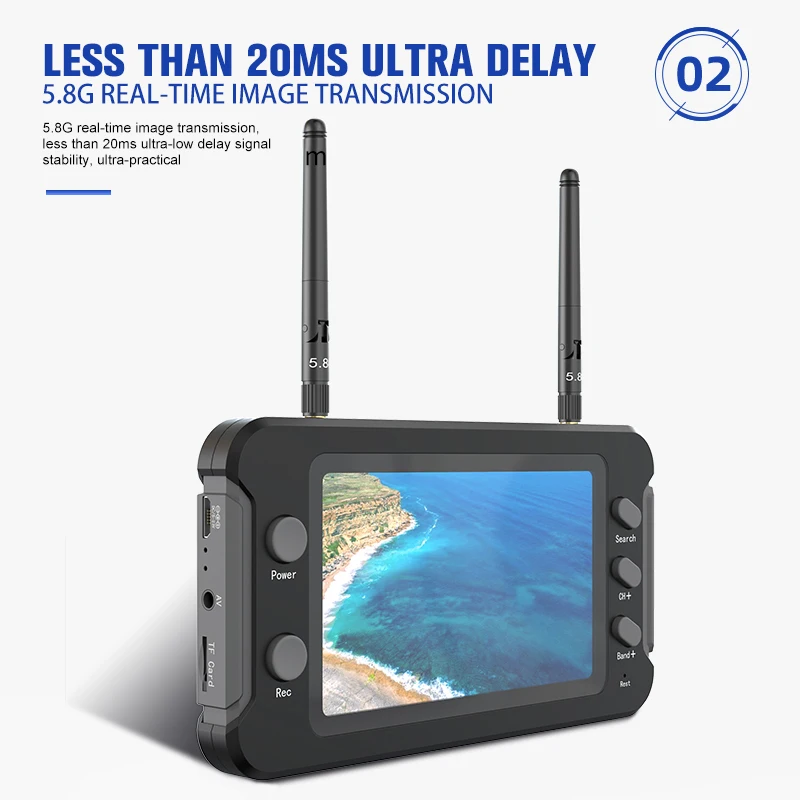
Someone buying their first FPV setup often expects a small 5.8GHz monitor to replace goggles. Another customer already owns goggles but needs a screen for a trainer, mechanic or camera director. Those are two very different purchases. The monitor may be exactly what the second person needs—and the wrong primary display for the first. Compatibility and the viewer’s job matter more than diagonal screen size.
Check the signal system before discussing screen size
A monitor advertised as 5.8GHz 40-channel analog generally receives analog FPV video. It will not decode a DJI O4 digital downlink just because both use frequencies around 5.8GHz. The modulation, receiver and video protocol are different. Before ordering, identify the camera and VTX on the aircraft, the selected band and channel, and whether the monitor has a compatible receiver built in. If you fly DJI O4, Walksnail or HDZero, verify the supported digital receiving/HDMI arrangement separately.
Why goggles feel different from an external screen
Goggles keep the pilot’s attention on a larger apparent image and reduce many external lighting distractions. A monitor is easier to share with a spotter or director but can suffer from reflections, glare and a much smaller angular picture. In the bright UAE sun, a monitor that seems perfectly sharp indoors may be difficult to read unless shaded properly. Those ergonomic differences matter even when both receive the same analog signal.
For examples of the pilot’s goggles, see the SKYZONE Cobra SD analog box goggles or the SKYZONE SKY04X PRO with its included analog receiver. A spotter’s monitor must still be tuned to the same analog channel as the aircraft.
Do not choose between them on advertised display resolution alone; assess receiver latency, viewing position, power source and field visibility.
DVR is a useful diagnostic—not necessarily master footage
An analog monitor with DVR can record the received signal, including static, breakup and OSD information. That is excellent for analyzing a loss of picture, remembering an error message or reviewing a pilot’s approach. But it records the compromised transmission, not a pristine original from an onboard camera. For professional footage, plan a separate onboard recording system if quality is required.
Test how recordings are stored, whether a memory card is supported and which format is actually saved. A product labelled ‘DVR’ does not automatically support high-bitrate HD capture.
Who should buy which?
| User | Practical first choice |
|---|---|
| Primary analog FPV pilot | Goggles with verified receiver compatibility and fit |
| Instructor or workshop technician | Monitor for shared live view and bench testing |
| Client or video director | Monitor or approved feed output, not a second flight-control link |
| DJI O4 owner | Digital-compatible output solution; analog screen alone will not work |
A simple buying checklist
Confirm the video standard, channel plan, antenna connector, screen brightness, battery input, recording media and mounting support. If you want a spectator screen, decide where the receiver will sit and whether cable or wireless reception produces the more reliable result. Keep the pilot’s video link independent and do not assume that adding a display allows someone else to pilot safely.
For instruction, a monitor can be worthwhile even if the pilot continues wearing goggles. The value lies in communication and diagnostics, not pretending a cheap screen is a direct replacement for a properly fitted immersive system.
Before checkout
Confirm exact model revision, electrical limits, connections, any included accessories and the manufacturer’s installation notes. Good fitment is a system property: matching one specification does not confirm the rest.
A field-monitor setup for an instructor
A beginner pilot wears compatible analog goggles while an instructor watches a separate monitor tuned to the correct analog channel. The instructor can see missed lines, OSD warnings and loss of picture, and review a DVR segment after landing. This helps coaching because both parties can refer to the same frame. But the instructor’s display is not a substitute for a spotter, nor should a pilot divide attention between flying and looking at a small ground monitor.
Position the monitor out of direct sunlight, give it a secure power source and route antennas away from metal obstructions. Check that the screen can be seen from the intended viewing angle. A 4.3-inch display may be perfectly adequate at the workbench yet uncomfortable for two people standing side by side outdoors.
Why record quality and preview quality diverge
A monitor DVR records exactly what its receiver was able to decode. It is useful evidence when investigating channel noise or intermittent video problems, but it includes those transmission artifacts. It cannot reconstruct the original camera quality lost in the RF link. For high-quality marketing footage, use a proper onboard recording route and keep the analog DVR for safety and technical review. Before buying, verify recording format, memory-card capacity, power input and the exact channels supported by the receiver.
Setup detail: what a 40-channel number doesn’t answer
Analog receivers and transmitters must operate on a common band and channel. A screen labeled ’40CH’ tells you how many presets it recognizes, not whether the attached antenna is well matched or whether the feed is legal in a particular location. Record the intended channel, check the VTX table and avoid transmitting on a frequency just because the monitor can tune it. When two pilots fly together, organize channel separation rather than assuming automatic selection will prevent interference.
For a client monitor, also ask whether an operator needs audio, external video output or merely a basic picture. A DVR can help document a flight, but it does not replace the higher-quality source footage for editing. A compact monitor is most valuable when its features match a specific operator’s task.
Customer questions
Will a 5.8GHz analog monitor show DJI O4 video?
No. Same broad frequency band does not imply compatible video modulation.
Is a monitor with DVR better for recording?
It records the received feed for review, not necessarily production-quality video.
Can spectators use a monitor while I wear goggles?
Often, with a compatible receiver or approved video output. Check channel and system compatibility.

















