


DJI Panorama Has Doubled Cars or Bent Buildings? Fix Stitching Ghosts at Capture

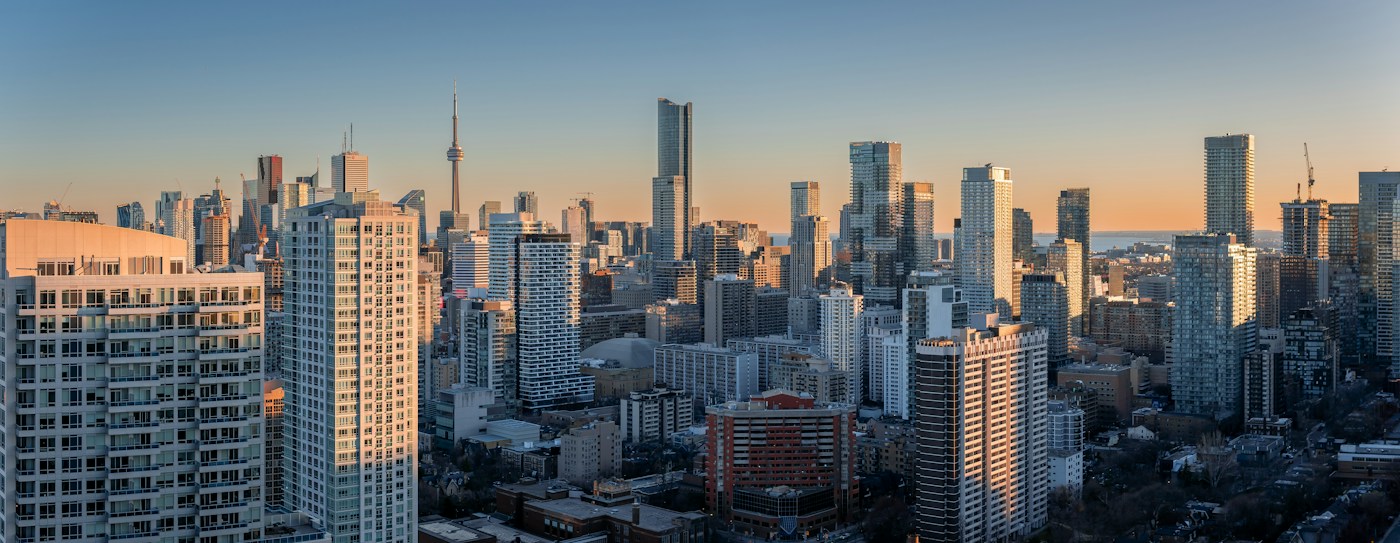
Panoramas are built from a sequence of overlapping photographs, not one instantaneous exposure. Moving vehicles, nearby buildings and exposure changes are common reasons why a finished image shows doubled edges even when the camera is sharp.
Identify the panorama stitching artifact
Panorama defects tend to fall into three visual patterns: moving-subject ghosts, parallax-distorted geometry and exposure seams. Identifying the pattern while the aircraft is still on location can save a complete return trip for a reshoot.
| Observation | What it suggests |
|---|---|
| Doubled people or vehicles | Subjects moved between panorama frames |
| Bent nearby rooflines | Foreground/background parallax |
| Visible brightness bands | Exposure or white balance varied between frames |
Diagnostic path
1. Choose a quieter scene
For real estate or architectural shots, avoid busy traffic corridors and wait for pedestrians to leave overlap areas. The more slowly objects move relative to the capture sequence, the easier the stitch.
2. Reduce parallax
Fly at a safe distance from nearby facades and tall poles. Rotation of a camera above close foreground objects changes geometry between exposures and defeats seamless blending.
3. Hold exposure consistent
Where the model permits it, use a controlled exposure and white balance before starting the sequence. Variable cloud cover or direct sun can still produce seams.
4. Preserve source frames
Enable saving original panorama captures when the aircraft/app supports it. These give a desktop stitching tool more control over masks, ghost removal and horizon alignment.
5. Review on a large display
Inspect overlaps at 100%, not only the thumbnail. If a structural edge is misaligned, make a new capture from a less parallax-prone position rather than excessively warping geometry.
Detailed diagnosis and real-world examples
Why panoramas create ghosts in places you did not notice
A panorama usually comprises successive photographs acquired while the aircraft rotates or moves its camera. Those photographs overlap spatially but not temporally. A car that moves between two overlapping frames may appear twice, with its front end in one alignment and its rear in another. People, pets, sea waves and trees blowing in the wind produce the same problem, sometimes with obvious semi-transparent edges. Stitching software has to select, blend or reject overlapping content. If no frame records an unobstructed background, the software cannot perfectly reconstruct it. The most reliable cure is often a better-timed new capture rather than extensive retouching after returning to the office.
Parallax and why close architectural subjects are difficult
Nearby columns, roof parapets and poles shift against a distant skyline as the camera position changes. The closer the foreground object, the stronger that relative shift becomes. When overlapping frames cannot be aligned at both near and far depths, software may bend a building edge or duplicate a railing. Avoid flying too close to foreground obstructions when the objective is a clean wide panorama. Choose a position where the key subject is farther from the camera and the scene presents fewer abrupt depth changes. An open aerial view may stitch naturally while the same orbit taken metres from a facade refuses to align, even with sharp images.
Capture decisions that reduce editing time
Before opening the automatic panorama mode, verify the camera lens is clean, the aircraft is stable and the flight path is safe. If the model offers manual white-balance and exposure options for the chosen capture mode, prefer a repeatable setting that does not produce large brightness jumps between frames. Consider waiting for an interval of relatively steady light rather than starting while sunlight passes behind moving clouds. Don’t use extremely slow exposure in wind or when the aircraft cannot hold a stable pose. Review not just the final thumbnail but the individual captures, where supported, because that tells you whether a ghost is a capture-stage phenomenon or a stitching-stage artefact.
How to repair one flawed overlap
When saving source panorama frames is supported, import them into a professional stitcher and inspect the pair responsible for the duplicate. Choose a consistent source for moving objects, mask overlapping versions and check the seam at high magnification. For architectural geometry, give the software reliable alignment points on stable structures rather than water, moving foliage or blurred foreground. Correct horizon and lens projection before globally warping building edges. If masking one car makes another area of the roadway disappear, you may have insufficient source coverage. Mark such gaps instead of silently presenting a fabricated commercial property image.
A repeatable property-photography test
For a real-estate shoot, run one wide panorama from a safely elevated location and one from a second location with improved foreground clearance. Note wind direction and any moving-traffic zones. Compare both at the same final width, not only at native pixel resolution, because stretching and seam errors can look worse after delivery for a website banner. When the shot includes windows and bright sky, check whether exposure is consistent across frames and whether highlights remain recoverable. Clients notice broken rooflines and duplicated parked cars more than marginal increases in sharpness. Prioritize geometrical correctness over extreme resolution.
Buying advice: software first, new aircraft last
If ordinary single-frame photos are sharp and the distortion occurs only after a panorama stitch, replacing the camera is unlikely to help. Determine whether the current DJI app saved originals and whether another stitcher can handle moving subjects. If the mission requires very high geometric fidelity for inspection or photogrammetry, a creative panorama mode is not the same as a calibrated mapping workflow. Plan overlap, ground control and capture geometry using the intended photogrammetry software and applicable equipment. An attractive spherical photograph and an accurate measurement deliverable are distinct products with distinct tolerances and validation requirements.
Buying or repair decision
A panorama seam is usually a capture-or-stitching problem before it is a hardware purchase decision. Confirm whether a configuration, cabling, accessory or environmental factor explains the symptom first. Then compare exact compatibility—not the marketing name alone—and keep original parts until the cause is established. Relevant options are available through FalconFly UAV’s own store category.
Field case studies: what the symptoms really tell you
Case 1: A moving vehicle appears twice in the final street panorama
Compare adjacent original frames if the aircraft saved them. The moving subject may have shifted between exposures while the stitching tool tried to merge both. Choose a quieter capture interval or a location where the traffic passes through fewer overlapping regions. A manual mask may select a single clean version of the car, but cannot recover scenery hidden in every source. For a commercial real-estate image, document edits and avoid inventing building or road geometry. A cleaner capture almost always costs less time than extensive seam repair.
Case 2: The walls of a nearby building look curved
First separate lens projection from scene parallax. Panoramas intentionally map a wide field of view into a projection, so some straight edges near the boundaries can appear bent depending on how the result is displayed. Close foreground columns may also shift against distant structures between frames. Inspect the image in the correct panorama viewer and try alternative projection choices before attempting arbitrary warp tools. If the geometry remains broken, fly from a position with more clearance to close objects and make a new capture.
Case 3: The sky has clear brightness bands
A sequence captured as sunlight changes may contain different illumination and colour across frames. Automatic exposure or white balance shifts can create visible seams even when each image looks acceptable individually. Where the aircraft’s panorama mode permits it, choose stable exposure parameters; otherwise capture when the light is consistent and inspect the source set after shooting. In postproduction, global colour adjustment alone may not fix region-specific seam exposure. Matching neighbouring frames before stitching is often more effective than applying a strong contrast filter to the final composite.
Case 4: The customer needs a measurable facade rather than a pretty panorama
A consumer panorama is designed for visual coverage, not automatically for calibrated geometric measurements. Perspective projection, stitching transforms and lack of surveyed control can alter lengths and angles. For engineering measurements, define accuracy requirements and use an appropriate photogrammetry or survey method with known scale and validation checkpoints. Do not provide a dimension derived from an unvalidated stitched panorama as a certified measurement. The right product recommendation depends on deliverables, control points, software support and operator training as much as the camera model.
Workshop examples and decision checks
When a property client needs accurate geometry
Panoramic marketing images can be beautiful while still containing geometry that would be unacceptable in a technical inspection. A bent wall edge may be a visual stitching artifact, not evidence that the building itself is crooked. Avoid using a consumer panorama output as a measurement source. If the deliverable requires dimensions, facade alignment or survey accuracy, use the intended calibrated photogrammetry workflow with adequate overlap, correct camera geometry and appropriate validation. Tell the client which image is illustrative and which is a measurement deliverable. Presenting warped panoramas as measured architectural evidence can mislead and create costly disputes.
Choosing a scene before choosing a setting
Look for moving objects in overlap regions, strong foreground depth differences and rapidly changing light. A quiet courtyard with distant static features may stitch far better than a dramatic nearby rooftop full of people and moving vehicles. If wind shifts trees and flags between frames, consider a different direction or wait for calmer conditions. Try two candidate positions: one that maximizes visual appeal, another that minimizes parallax. Review overlap seams before leaving so a flawed source sequence can be repeated while the aircraft is still on site. Software cannot create missing background that no frame ever captured.
The relationship between exposure and seam visibility
When the camera varies exposure between shots, the stitcher may blend differently exposed patches that are hard to hide along plain walls or sky. White balance shifts can introduce colour differences even when overall brightness looks similar. Where the selected panorama mode supports it, lock consistent camera settings; where it does not, at least favour stable lighting and avoid large clouds moving across the sun during the capture. Very bright reflections or transparent glass can also confuse feature matching. Shoot a conventional single frame as a reference for colour and geometry. This gives the editor an independent visual target instead of trusting every automated adjustment.
What to do with an already flawed panorama
Identify the precise overlap that generates ghosting by comparing the original frames. For a moving car, mask it from one frame and choose another without the duplicate when source coverage permits. For structural bends, inspect camera calibration and projection settings before manually transforming the wall. Some distortions can be reduced by selecting different control points, but forcing an aggressive warp can create new problems in neighbouring regions. If the image will be used commercially, disclose substantive content removal or retouching according to the project’s requirements. If the error cannot be corrected without fabricating details, arrange a reshoot rather than hiding it with extreme blur.
A final QC pass at the client’s intended size
Check the exported panorama in the crop and display size it will actually occupy: a wide website hero, a 360-degree viewer and a vertical social teaser expose different defects. Zoom into buildings, roads and moving-subject boundaries. Verify the horizon, lack of duplicate cars, consistent window lines and absence of repeated shadows. A seam that is invisible on a phone may become obvious on a desktop landing page. Save original frames, corrected output and a project note describing the stitcher settings. This archive helps when a client later requests a different aspect ratio or a higher-resolution banner.
Featured panorama photograph: Hamed Naji / Unsplash. Used as an illustration of wide-angle urban panorama composition.
Frequently asked questions
Can software fix doubled cars?
Sometimes by selecting a single source exposure or masking, but it cannot reconstruct every hidden area.
Should I shoot closer to the building?
Usually not if close-range parallax is causing stitching errors.
Before your next flight or project
Review panorama seams at the same size the client will see, paying attention to moving vehicles, façade edges and changes in exposure. Keep original source frames so an uncertain stitched detail can be corrected or disclosed rather than fabricated.
Panorama stitching methodology: Adobe’s official panorama merge guide explains projection choices and why consistent exposure and source-frame alignment matter. For DJI panorama export and access to source files, use the separate manufacturer link below.
Technical reference
DJI RC 2 panorama export and stitched-photo handling guide describes how original and stitched panorama files are accessed on supported DJI equipment.
DJI panorama capture and sharing guidance. DJI panorama modes and source-frame retention depend on the camera and aircraft model.

















