


DJI Fly Preview Lags When Your Phone Gets Hot? Diagnose Summer Thermal Throttling


Dubai sun can overheat a smartphone that is decoding live video while its display is at maximum brightness. A dropped phone frame is not automatically evidence of drone transmission failure, so isolate the display, app and RF link.
Separate phone thermal throttling from RF interference
A hot smartphone can stutter while the aircraft continues recording normally, but a true radio-link warning must not be dismissed as thermal lag. Check both the phone’s responsiveness and the aircraft’s transmission indications to choose a safe next step.
| Observation | What it suggests |
|---|---|
| Phone very hot and app sluggish | Possible thermal throttling |
| Aircraft warnings and RC link metrics degrade | Investigate transmission separately |
| Same controller works with cooler device | Phone-side load and temperature may matter |
Diagnostic path
1. Shade the mobile device
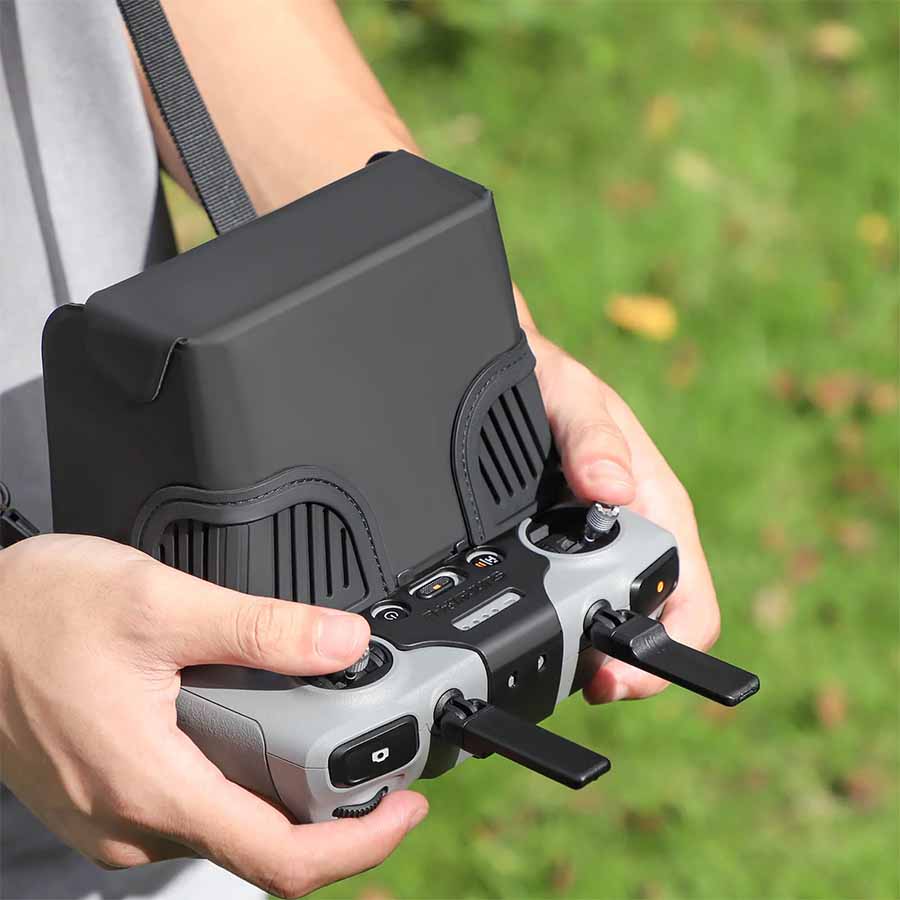
Move into shade or use a safe sun hood that does not trap heat; never obstruct cooling vents. Avoid leaving the device on a car dashboard.
2. Reduce competing load
Close unnecessary background processes, stop screen recording for a comparison flight, free storage and verify app compatibility.
3. Read link indicators
Compare DJI Fly transmission warnings, distance and signal status. App rendering lag may occur even with a stable aircraft link.
4. Change one factor at a time
Compare a cooler supported phone, same aircraft and same takeoff conditions. Keep flight short and safe while diagnosing.
5. Avoid risky workarounds
Do not chill electronics with condensation-producing methods or ignore an aircraft/remote thermal warning. Land promptly if control/vision reliability is affected.
In-depth tests and operating guidance
What summer thermal throttling actually changes
A smartphone running DJI Fly simultaneously renders live video, decodes the incoming stream, draws a bright user interface and may record its own screen. In direct summer sun, high ambient temperature and high display brightness reduce the device’s ability to dissipate heat. A phone may lower CPU or GPU speed to protect itself, making menus or preview frames slow. That is a device-side performance issue; the drone’s actual recorded media and control radio link may remain normal. But do not treat every choppy screen as harmless: a true transmission warning or loss of situational awareness still requires an immediate conservative flight response.
The five-minute comparison test
During safe nearby preflight checks, note phone temperature warning, screen brightness, background recording apps, aircraft signal indicators and whether the lag affects menus as well as live video. Move the operator into suitable shade where the aircraft can remain clearly visible and the controller retains radio line of sight. Compare after the phone cools under normal ambient conditions. If menu interactions become responsive while the RF indicator remains stable, phone-side thermal load is plausible. If RF loss persists regardless of phone temperature and varies with antenna orientation, investigate the communication path instead. Repeating long distance tests while the preview is unreliable is not a valid diagnostic method.
Phone case, sun hood and cable trade-offs
A sun hood may improve visibility but some designs trap heat around the screen or ventilation area. A thick insulating case can also slow heat dissipation; remove only when appropriate and safe for the mounting arrangement. Use a supported data cable with a secure connector so an intermittent phone/controller link does not masquerade as thermal throttling. Check whether charging the phone while flying increases its heat. A shade structure should not obstruct the controller’s antennas or force the pilot to look away from the aircraft. A small environmental change may do more than changing a dozen arbitrary app settings.
Software-load checks that do not endanger the flight
Close unnecessary background applications and verify the supported DJI Fly release for the phone and aircraft. Check free storage, active screen recording, excessive background syncing and any phone low-power or thermal warnings. Do not clear flight logs or reset the aircraft as the first reaction to screen lag. Test any app reinstall or firmware change only after backups and on the ground, following DJI support instructions. A remote controller with its own display has a different thermal design and may still throttle in high heat; moving to an integrated controller does not promise unlimited operation above its specified temperature range.
Differentiate cached preview from the aircraft master
If the phone preview is visibly dropping frames, inspect an actual onboard original recording afterward. A smooth camera master coupled with sluggish phone menus points toward a local monitoring problem. If the aircraft itself reported transmission loss or camera overheating, collect the relevant log and warnings; don’t declare the phone the sole cause. Live video and control signals may share elements of a system while being monitored separately. Do not infer flight safety from one status icon. A safe return and landing may be more appropriate than continuing a time-sensitive commercial shoot with unreliable visual feedback.
How to plan a summer field shoot
Schedule work for allowable cooler periods when practical, protect devices from direct sun and carry spare charged controller/phone equipment within their documented operating limits. Build a shade-and-ventilation plan at the launch point and verify cable routing before the first take. Short segments with equipment checks can be safer than hours of continuous idle operation. For a customer reporting recurrent thermal warnings, ask for the phone model, operating system, DJI Fly version, temperature, attached case, and whether the issue occurs outdoors only. Buying an expensive replacement controller before conducting this basic comparison may not solve the problem.
Buying or repair decision
When the phone overheats, compare shade, app load and cable stability before investing in a new remote. Confirm whether a configuration, cabling, accessory or environmental factor explains the symptom first. Then compare exact compatibility—not the marketing name alone—and keep original parts until the cause is established. Relevant options are available through FalconFly UAV’s own store category.
Field cases and decision checklist
Case 1: The phone shows a temperature warning and DJI Fly becomes sluggish
This pattern suggests a device-side performance limit, particularly if the aircraft retains stable link metrics and onboard recording quality. Move to a safe shaded environment, reduce unnecessary display or background workload and allow normal cooling within the phone manufacturer’s guidance. Do not place the phone in ice or create condensation through rapid chilling. If control view becomes unreliable, land safely instead of continuing a commercial flight. Verify whether menus are also delayed, because that is a clue the whole device is struggling rather than only the incoming video stream.
Case 2: The screen freezes but the phone is cool
Consider a video transmission issue, app compatibility or a cable/connector problem. Review the DJI signal indicators and any controller messages, and compare the behaviour under safe short-range line-of-sight conditions. An intermittent USB cable between phone and remote can create disconnect symptoms unrelated to air temperature. Test only supported cables and controllers. Avoid flying beyond visual range to see if the feed recovers. If the aircraft itself reports overheating or a weak RF link, follow those warnings independently and preserve the flight logs for accurate diagnosis.
Case 3: The problem appears only when screen recording is on
Recording the phone screen adds CPU/GPU or memory load and can consume substantial storage bandwidth. Conduct a controlled comparison with screen recording disabled and other apps closed, maintaining identical safe flight conditions. If responsiveness returns, adjust the content-production workflow rather than changing aircraft camera settings. When the pilot needs a client monitoring recording, consider a supported aircraft master or separate approved recording path rather than overloading the same display used for flight safety. The pilot must retain a trustworthy primary view regardless of the marketing team’s requirements.
Case 4: The customer wants a new controller to solve all summer problems
An integrated DJI controller has a different processor and cooling arrangement from a phone-based setup, but it still has a published operating temperature range and model-specific aircraft compatibility. Compare the intended ambient conditions, display visibility, app support and availability of a safe shaded operating station. Do not guarantee an expensive controller will never lag in extreme heat. First check phone case, cable, direct sun, device background load and firmware support. A repeatable test and diagnostic log are a better buying basis than an anecdote that one device ‘feels cooler.’
Field examples and further verification
Thermal throttling affects the phone, not necessarily the aircraft
A phone may be decoding live video, drawing the DJI Fly interface, using its radios and keeping the display at maximum brightness in direct sunlight. It can limit CPU or GPU frequency as it warms, making the video preview and app controls feel slow. However, the aircraft’s command link and camera recording are different parts of the system. Confirm whether the aircraft issued an RF or camera warning instead of dismissing everything as a phone problem. A lagging screen can impair situational awareness even when onboard recording is fine. If essential flight feedback becomes unreliable, return and land conservatively instead of continuing the shoot.
How to isolate the influence of heat
Perform a short controlled comparison with the same aircraft and controller near the takeoff point. Note phone temperature messages, background apps, recording modes, display brightness and radio signal warnings. Then move to suitable shade without obstructing antennas or losing visual contact with the aircraft. Allow the device to cool under normal conditions and compare responsiveness. If the menu and preview recover while signal metrics stay stable, thermal throttling becomes more plausible. If the link indicators remain poor or vary strongly with antenna orientation, investigate RF and cabling separately. Do not fly farther away or near obstacles simply to make the lag occur again.
Why some sun hoods make things worse
A dark hood may make the screen easier to see but also trap warm air around the phone or remote. Thick insulating cases and active phone charging can add heat. Try removing unnecessary cases where the mount remains safe, reducing screen brightness to the lowest usable level and keeping the operator out of direct sun. Do not direct condensation-producing air onto electronics or place a hot phone against ice packs. Check that any hood permits adequate ventilation and does not obstruct controller antennas. A reliable shade structure, spare cables and short cooling breaks may be more useful than immediately buying a new aircraft.
Software and cable issues can imitate heat
An overloaded or unsupported phone OS, outdated application, insufficient storage and competing background tasks may produce lag even in cool weather. Verify the supported DJI Fly version and phone compatibility before making changes. If the phone connects to an external remote by a cable, inspect the connector and use a known-good cable; an intermittent connection can resemble transmission trouble. Preserve logs and configuration before reinstalling the app. Avoid deleting flight records or resetting the aircraft as a first troubleshooting step. When comparing devices, keep the aircraft, controller and location similar so that the result tests the phone rather than introducing new RF variables.
A field procedure for UAE summer operations
Brief the crew about heat risks before the first takeoff. Put phones, remotes and spare batteries in a shaded, ventilated location that complies with product environmental limits. Confirm live-view clarity and flight warnings before starting a long tracking shot. Use planned pauses and carry a second compatible device when the mission warrants redundancy. Do not leave the controller or phone idle in a parked vehicle under sun. If lag repeats, document which equipment became hot, the operating conditions and whether the aircraft original footage remains smooth. A measured diagnosis is more valuable than declaring that every DJI Fly delay requires a high-end remote upgrade.
User experiences versus an official diagnosis
DJI pilots have reported phone brightness dropping and interface responsiveness deteriorating in direct sun; some say shade improves usability. These reports illustrate why local device temperature belongs in a live-view diagnosis, but they do not prove every lag event is thermal. DJI’s official live-view troubleshooting guide separately lists RF interference, firmware compatibility and display performance. Pilot experiences: DJI Fly phone overheating.
Frequently asked questions
Does a fast processor guarantee no overheating?
No. Ambient temperature, direct sun and heat dissipation still matter.
Should I fly farther to test reception?
No, perform a controlled nearby diagnosis first.
Before your next flight or project
If phone responsiveness degrades in heat, shorten the operation and move the operator into safe shade while maintaining clear aircraft visibility and radio line of sight. Treat aircraft transmission warnings as separate and potentially safety-critical, even when the phone itself is hot.
Technical reference
Official DJI Fly download and version information. Confirm the DJI Fly release and supported phone/controller combination before changing software.

















